
Podcast Recorder: Your Whole Episode in One Browser Tab
Record your podcast with pause, resume and crash-safe saving.
Free to start.
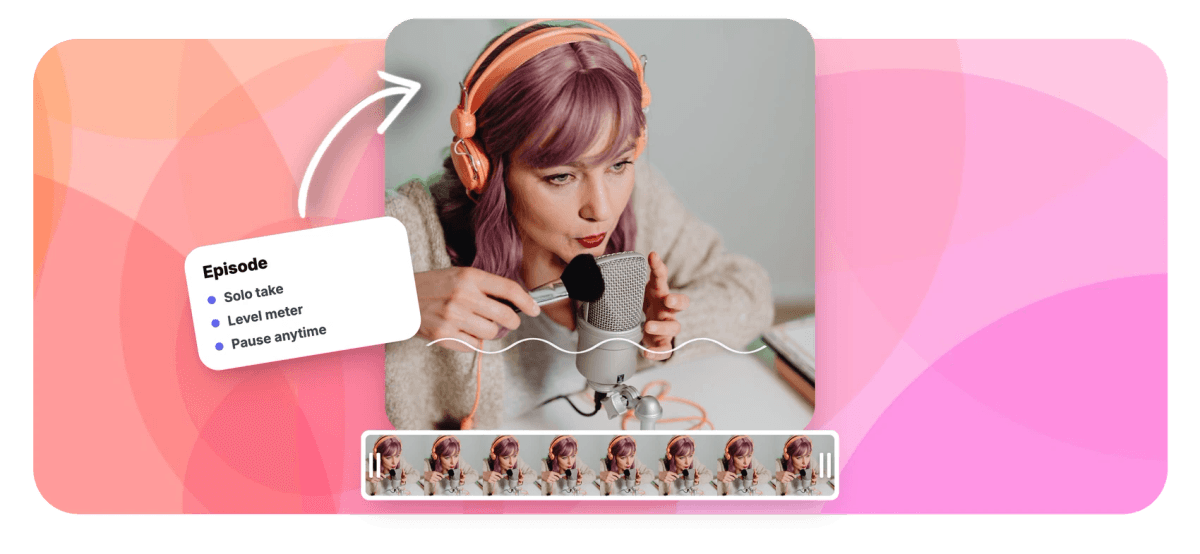
Pick your mic, watch the live waveform confirm your level, and record up to 60 minutes with pause and resume. Takes are checkpointed as you speak.
Teams that use EchoWave





Record the episode, skip the studio booking
EchoWave's podcast recorder captures your microphone right in the browser: pick a mic, watch the live waveform ride your level, count yourself in and record up to 60 minutes per take, pausing between segments whenever you need a breath. It records you, which is exactly what a solo show needs for episodes, narration, intros, outros and ad reads, and every take is checkpointed as you speak, so a crashed tab does not cost the recording. Save the take into the editor to cut filler words and tighten long silences, lay a music bed under your voice, caption every word, then export the audio or turn the episode into a video for social feeds.
Episode 12, take one, kitchen table.
- 60 minutesOne take covers a full solo episode, and pauses stop the clock
- 0.3-2.0sAdjustable silence threshold when you trim dead air in the editor
- 170+Caption presets for turning the episode into social clips
- 50+Transcription languages for show notes, captions and subtitles
How to record a podcast online
From blank tab to finished episode in four moves.
-
1. Open the Recorder and Allow Your Mic
Open EchoWave's recorder in your browser and choose microphone-only mode. Grant mic permission, then pick the microphone you want from the device list.
-
2. Check the Waveform and Count In
Say a test line and watch the waveform move to confirm your level. Set a 3, 5 or 10 second countdown, and load the teleprompter if the segment is scripted.
-
3. Record the Episode in Segments
Press record and deliver the show. Pause between segments to reset, and let checkpointing guard the take; each take holds up to 60 minutes of recording.
-
4. Produce and Publish
Download the raw audio instantly, or save it to the editor to trim, cut fillers and silences, add a music bed and captions, then export audio or a social-ready video.
A recording chain built for talk
Everything between the first count-in and the published episode.
-
Your Mic, Captured Cleanly
The recorder captures one local microphone: yours. That makes it a natural fit for solo shows, narration and host segments, and it means nothing streams anywhere while you record.
-
Levels You Can See
A live waveform rides your voice while you record. If the line goes flat mid-sentence, you know the mic dropped out before you narrate twenty minutes into the void.
-
Pause Between Segments
Record the cold open, pause, pull up your notes, resume for segment two. A take holds 60 minutes of actual recording, and the count-in gives you 3, 5 or 10 seconds of runway.
-
Checkpoints, Not Prayers
The take is checkpointed in small chunks while you talk, so a crashed tab, a dead battery or a misclick leaves a recoverable recording instead of a rerecord.
-
Teleprompter for Scripted Segments
Load your intro, ad read or outro into the floating teleprompter, set the scroll speed, and deliver it clean. It overlays the recorder and never appears in the recording.
-
Produce It in the Same Place
Save the take to the editor to cut fillers and silences, lay music and sound effects under your voice on separate tracks, and export audio, or video with captions.
Shows that start with one voice
-
Solo Hosts
Record a full episode in one sitting, pausing between segments, and publish without ever opening a DAW.
-
Interview Show Hosts
Record intros, outros, ad reads and pickups around conversations captured elsewhere, then assemble everything on one timeline.
-
Narrative Podcasters
Read scripted narration off the teleprompter in long, steady takes, with checkpoints protecting an hour of careful delivery.
-
Producers and Editors
Grab pickup lines and corrections the moment an edit reveals a flub, without rebooking anyone's studio time.
-
Clip and Social Teams
Turn the week's episode into captioned audiograms and teaser clips sized for vertical feeds.
-
First-Time Podcasters
Start a show with the mic already in your laptop: no interface, no software, no budget for episode zero.
Your show is one take away
Open a tab, press record and get episode one out of your head.

Podcast recorder FAQ
How do I record a podcast online?
Open EchoWave's recorder in a modern browser, pick microphone-only mode and allow mic access. Choose your microphone, confirm the live waveform moves when you speak, set an optional count-in and press record. Deliver the episode, pausing between segments whenever you need to; each take holds up to 60 minutes of recorded audio. When you stop, download the file immediately, or save it into the editor to cut filler words, tighten silences, add music and captions, and export the finished episode. Nothing to install, and recording works without an account.
Can I record a video podcast?
Yes. Switch the recorder from microphone-only to Camera mode to film yourself at up to 1080p, or to Screen and Camera to show slides or a browser with your face in a corner or side by side. A take still runs up to 60 minutes. Each part lands as its own layer in the editor, so you can cut, caption and export the episode in 16:9 for YouTube plus short 9:16 clips. The videocast guide covers gear, framing and lighting.
Can I record a podcast with remote guests on EchoWave?
Not directly: the recorder captures one local microphone, yours, so it is built for solo episodes, narration and your side of a show rather than multi-guest calls, and there are no separate remote guest tracks. What you can do is record guests with whatever call tool you already use, then import that audio into the EchoWave editor alongside your recorded intro, questions and ad reads; the multi-track timeline lets you arrange, trim and mix the pieces into one episode.
What audio format does the podcast recorder produce?
The recorder uses your browser's built-in media encoder, so the raw file is typically WebM in Chrome, Edge and Firefox, and an M4A-style MP4 file in Safari. Podcast hosts accept common formats, but if yours wants something specific, save the take into the EchoWave editor and export from there, or convert the file after downloading it. Nothing is re-encoded until you choose to export, so the original capture quality stays intact.
How long can a podcast recording be?
A single take records up to 60 minutes of audio, and the limit only counts time while the recorder is rolling: pause for as long as you like between segments and it costs nothing. Most solo episodes fit comfortably in one take. For longer shows, record in parts, then drop the takes onto the editor timeline in order; they play back as one continuous episode and export that way too.
How do I cut ums, uhs and dead air out of my episode?
Save the recording into the editor and transcribe it, then run the clean audio pass: it reads the transcript, flags filler words like um and uh, and finds silences longer than a threshold you set between 0.3 and 2 seconds. Review each suggested cut, accept or reject it, and apply everything as one ripple edit with a time-saved summary; one undo restores the original. Prefer working in text? The transcript-based editor lets you select words and delete them, and the audio cut follows.
Can I turn a podcast recording into a video for social media?
Yes, and it is a big reason to finish the episode in the editor. Put the audio on the timeline, add a waveform or music visualizer that moves with your voice, drop in your cover art, and auto-transcribe to add captions with 176 presets. Canvas presets like 9:16 and 1:1 size the clip for Reels, TikTok and Shorts, and the export is a normal MP4, so listeners get something to watch in the feed instead of a bare audio link.
Where are my podcast recordings stored?
While you record, audio is saved in small chunks; that checkpointing is what makes crash recovery work, and nothing is saved to EchoWave during the take. Press download and you have the file. The recording is only saved to EchoWave if you choose to save it into the editor, which creates a project in your account so you can produce the episode from anywhere and pick up where you left off.
Is the podcast recorder free, and is there a watermark?
Recording is free and works without an account: open the page, record up to 60 minutes per take and download the audio, which never carries a watermark because there is nothing to watermark on a sound file. Plans matter when you export video from the editor: free video exports include a small watermark and cap at 720p, while paid plans remove the watermark and unlock 1080p up to 4K. So you can record and publish audio free, and upgrade only when you want clean video clips.
What creators say after trying EchoWave
Loading the reviews
This week's episode,
recorded today
Record an episodeThe mic is already plugged in: record, produce and publish from one browser tab.