
Make a Video Black and White in One Click
Click the Mono look to drop the color, then shape the monochrome with contrast, gamma and brightness. Live preview in your browser, free, no download or signup.


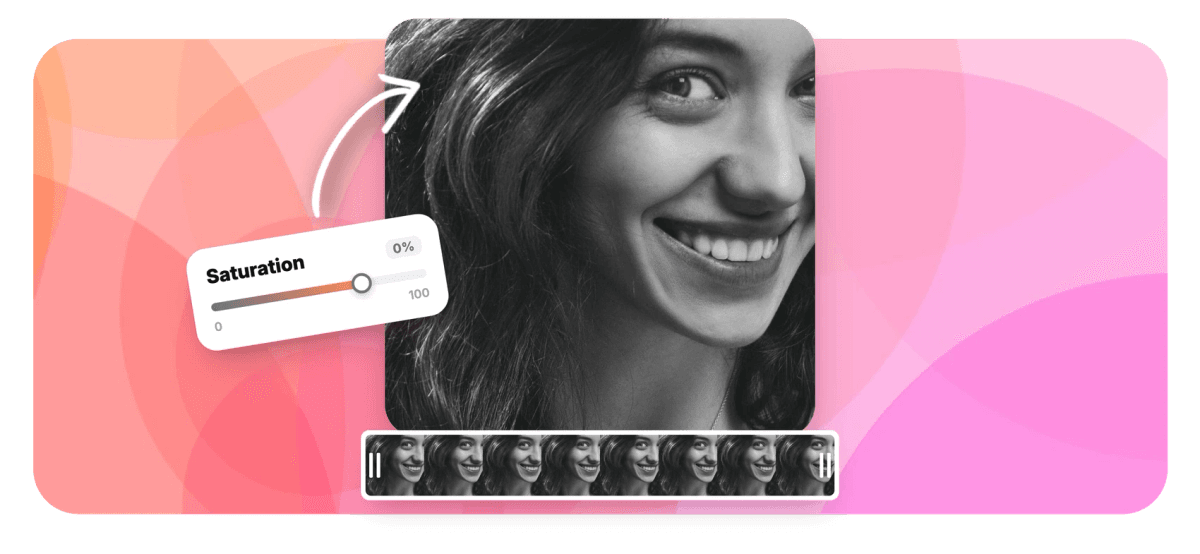
Make a Video Black and White in One Click Features
EchoWave's color tools are used by filmmakers, wedding editors and music video creators worldwide





Black and white
Good black and white is contrast work
Making a video black and white takes one click in EchoWave's color tool: apply the Mono look and every trace of color drops away. Good monochrome takes about thirty seconds more, because once color is gone, contrast does the talking. Raise it beyond what a color clip would tolerate, use gamma to keep the shadows from crushing, and set brightness for an airy or moody key. Every slider previews live on your footage and resets individually, and the export bakes the grade in. Prefer a faded look? Pull saturation partway down instead. For fixing casts and exposure there is color correction and brighten video; for monochrome as a creative choice, you are in the right place. Finish the cut in the video editor.
-
1 click
The Mono look converts any clip to black and white
-
0.1 to 3.0
Gamma range that keeps shadow detail out of the crush
-
Live preview
Each slider renders on your clip as you drag, with its own reset
-
Free
Convert and export in your browser, no signup
What you get
Black and white with real depth
One click converts. Three sliders decide whether it looks graded or just gray.
-
One-Click Mono Look
Mono is one of six built-in looks: one click desaturates the entire clip, no masks, layers or preset packs. Original sits beside it and brings the color straight back.
-
Contrast Does the Heavy Lifting
Without color, contrast is all the separation you have. Raise it after converting and the frame gains the classic monochrome punch: dense blacks, clean whites, and subjects that stand off the background instead of sinking into it.
-
Gamma Guards the Shadows
Punchy contrast can crush the dark end of the frame. Gamma, adjustable from 0.1 to 3.0, lifts the midtones so faces and shadow detail survive the stronger grade you just applied.
-
Brightness Sets the Key
The same black and white reads airy at a high key and brooding at a low one. Brightness shifts the whole tonal range, so the mood of the piece is a decision, not an accident of the original exposure.
-
Faded Color, Not Just Full Mono
Not every edit wants full monochrome. Drag saturation partway down, around 20 to 40 percent, for the muted, film-faded palette. It is honestly just low saturation applied evenly, and it suits vlogs, lyric videos and lo-fi montages.
-
One Clip or the Whole Video
This tool converts one file end to end. Inside the online video editor, the same controls apply per clip, so a flashback can go black and white while the scenes around it keep their color.
How it works
How to make a video black and white
Four steps, and only one of them does the converting.
-
Upload Your Video
Drag your clip into the color tool. It opens in the player with the looks row and the adjustment sliders beside it.
-
Apply the Mono Look
Click Mono to convert the clip to black and white instantly. The live preview shows the monochrome image you will shape next.
-
Shape the Monochrome
Raise contrast for the classic punch, adjust gamma so the shadows keep their detail, then set brightness for a bright or moody key. Each slider resets individually if you overshoot.
-
Export and Download
Export the finished clip. The black and white grade is baked into a standard MP4, ready to post or to keep editing.
Who uses it
Where black and white earns its place
-
Music Video Cuts
Monochrome flatters performance footage: stage lights become geometry, and a hard contrast grade gives the drop real weight.
-
Wedding Highlights
First dances and vows read as timeless in black and white, and they will still look right decades from now.
-
Street and Documentary
Strip the color and the eye goes to faces, gesture and light, the reportage look that never dates.
-
Fashion and Brand Films
Editorial monochrome with punched contrast makes texture and silhouette the story instead of the color palette.
-
Tributes and Memorials
A quiet, respectful treatment for remembrance and anniversary videos, in moments where color would feel too loud.
-
Lo-fi and Faded Aesthetics
Partial desaturation at 20 to 40 percent gives vlogs and lyric edits that muted, film-faded feel without losing color entirely.
Go black and white now
One click converts, three sliders make it timeless. Free, in your browser.
How creators use EchoWave in real projects

About the EchoWave team
EchoWave is a browser-based video and audio editor built by Lemon Vault LLC since 2018. The people who build the editor write these guides and test every step in the production app before publishing.
Black and white video FAQ
How do I make a video black and white?
Upload your clip to EchoWave's color tool and click the Mono look: the video converts to black and white in one click. Then shape the result, raise contrast for punch, adjust gamma to protect shadow detail, and set brightness for the overall mood. Everything previews live in your browser, and when it looks right, export. The monochrome grade is baked into a standard MP4 you can post anywhere.
Why does my black and white video look flat, and how do I make it filmic?
Desaturating removes color contrast, and if tonal contrast does not replace it the frame turns into gray mush. The recipe: after applying Mono, raise contrast noticeably further than you would on a color clip, which restores separation between subject and background. If the stronger contrast starts swallowing shadow detail, lift gamma slightly to bring the midtones back. Finally, nudge brightness to taste, higher for an airy look, lower for drama. Watch the live preview as you go; the difference between flat and filmic is usually those three sliders.
Can I fade the colors without going fully black and white?
Yes. Skip the Mono look and pull the saturation slider partway down instead. Around 20 to 40 percent saturation gives the muted, faded palette you see in lo-fi edits and nostalgic montages: color is still present, it just whispers. To be clear about what this is, it is ordinary low saturation applied evenly to the whole frame, not a film emulation or a selective effect. Pair it with a small contrast lift so the image keeps its structure, and preview live until the fade sits right.
Can I keep one color and turn everything else gray, like the red coat effect?
No. That technique, often called selective color or color splash, requires isolating an object with a mask and grading it separately, and EchoWave's color tool does not offer it: saturation changes apply to the whole frame evenly. If you want a look that reads as stylized without the isolation trick, try a strong partial desaturation with raised contrast, so the frame keeps a hint of its dominant color while feeling close to monochrome. It is a different effect, but an honest and quick one.
Does converting a video to black and white reduce its quality?
No more than any normal export. The conversion is applied during a full re-render, so resolution and frame rate stay exactly as they were, and the only change beyond the grade is the standard encoding pass every exported video goes through. If your source is heavily compressed, black and white will not repair existing artifacts, but it will not add new ones either. Moderate contrast settings keep the tonal range smooth.
Can I make just one clip black and white instead of the whole video?
Yes, in the EchoWave editor. The standalone tool on this page converts one file end to end, which suits a single clip or a finished cut. For mixed timelines, open the editor: the same color controls, including the Mono look, apply per clip, so a flashback or memory sequence can play in black and white while the scenes around it stay in color. Grade each clip on the timeline, preview the whole cut, and export once.
Can I compare with the color original or undo the conversion?
At any point before export, yes. The Original look returns the clip to its untouched colors in one click, which doubles as an instant before-and-after check. Each slider also has its own reset, so you can undo just the contrast push or just the gamma lift without losing the rest of the grade. Nothing is written into the file until you export, so experiment freely; the source video is never modified.
Is the black and white video converter free?
Yes. The color tool runs in your browser with no signup and no download: upload, click Mono, shape the grade and export at no cost. It is part of EchoWave's free tools suite, so you can send the converted clip straight on to other tools, trim it, resize it or add music without re-uploading, or continue into the full video editor when a project needs more than a grade.
Ready to go black and white?
Convert in one click, shape it with three sliders, export free in your browser.
Get Started →























































