
Silence Remover: Cut the Dead Air, Keep the Rhythm
Find every silent stretch in your video, tune the threshold from strict to relaxed, approve the cuts and apply them in one click. Automatic jump-cut pacing, free to start.


Silence Remover: Cut the Dead Air, Keep the Rhythm Features
EchoWave's editing tools are used by YouTubers, podcasters and educators worldwide





Automatic dead-air removal
Dead air is the silent killer of watch time
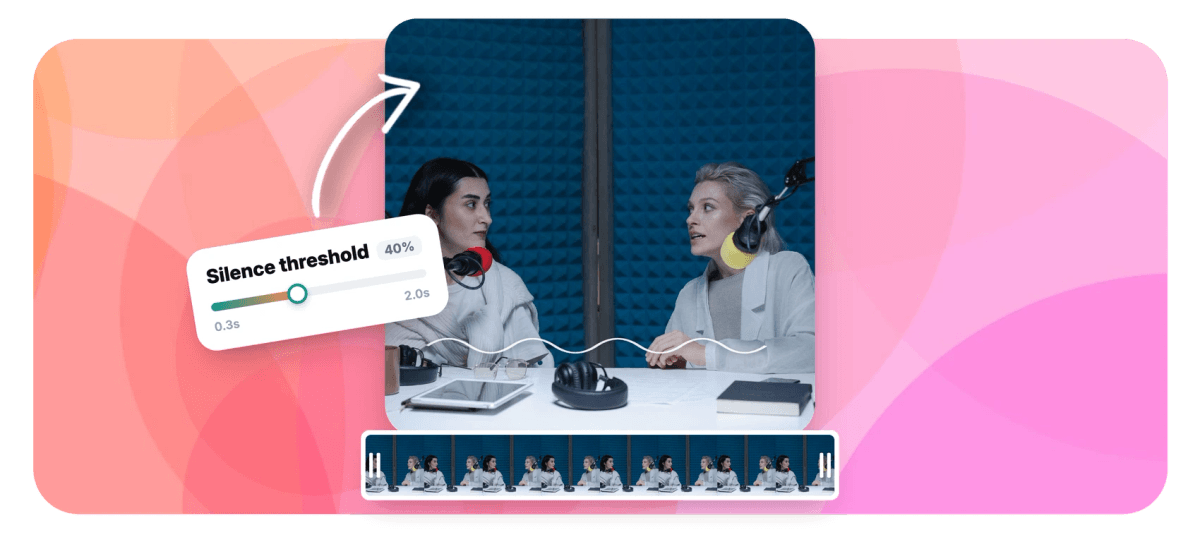
Every pause while you think, sip or find the next tab is a moment a viewer can leave. The jump-cut style that dominates YouTube exists precisely to delete those moments, and doing it by hand means hundreds of razor cuts. EchoWave detects silent gaps from your clip's transcript timing, lists them as proposed cuts with an adjustable threshold from 0.3 to 2.0 seconds, and ripple-deletes the ones you approve as a single undoable edit. It shares an engine with the filler-word remover, so ums and dead air can go in the same pass.
-
0.3 to 2.0s
Silence threshold, from aggressive jump cuts to gentle trims
-
Review list
Every proposed cut is yours to accept or reject
-
Time saved
See the new runtime before you commit
-
1 undo
All cuts apply as one reversible ripple edit
What you get
Jump-cut pacing without the razor work
The tedious part is finding the gaps. That part is automatic now.
-
Threshold You Control
Define what counts as dead air. At 0.3 seconds you get the rapid-fire jump-cut style; at 2.0 seconds only genuinely awkward gaps are flagged and natural speech rhythm survives.
-
Transcript-Timed Detection
Gaps are measured from the clip's speech-recognition timing, so detection knows the difference between a pause between sentences and a pause inside one. No transcript yet? One click generates it.
-
Approve Every Cut
Proposed cuts appear as a list you can audition and toggle individually. The dramatic pause stays; the tab-hunting silence goes.
-
Before-and-After Summary
EchoWave shows how many cuts, how much time removed and the new runtime before you apply, so you can feel the pacing change before you commit to it.
-
One-Click Ripple Apply
Accepted cuts are removed in a single ripple edit that closes every gap and keeps captions glued to the speech. One undo restores everything.
-
Pairs With Filler Removal
Run silences and filler words in the same pass: the ums disappear with the dead air, and your talking video comes out broadcast-tight.
How it works
How to remove silence from a video
Four steps from rambling to tight.
-
Upload Your Video
Add your clip to the EchoWave editor and open the Clean Audio tool. Talking videos of any length work.
-
Generate the Transcript
If the clip has no captions yet, one click transcribes it. The word timing is what the silence detector reads.
-
Tune and Review
Set the silence threshold, watch the proposed cuts appear, and accept or reject each one in the review list.
-
Apply and Export
Apply the cuts as one ripple edit, check the tightened runtime and export your video.
Who uses it
Everywhere pacing is the product
-
YouTubers
The jump-cut look that keeps retention graphs flat, produced in minutes instead of an evening.
-
Podcasters
Trim the thinking pauses from interviews without touching the conversational flow.
-
Lecturers and Course Creators
A 40-minute lesson with the dead air removed is a 32-minute lesson students finish.
-
Webinar Repurposers
Live sessions accumulate silence by nature. Strip it before the replay goes on demand.
-
Demo Recorders
Cut the pauses where you clicked around and the demo suddenly looks rehearsed.
-
Short-Form Clippers
Shorts and Reels have no time for air. Tighten source clips before cutting them down.
Remove the silences now
Automatic detection, human-approved cuts, one-click pacing. Free to start.
How creators use EchoWave in real projects

About the EchoWave team
EchoWave is a browser-based video and audio editor built by Lemon Vault LLC since 2018. The people who build the editor write these guides and test every step in the production app before publishing.
Silence remover FAQ
How do I remove silences from a video automatically?
Upload the video to EchoWave, open the Clean Audio tool and generate the transcript if there is none. Enable silence detection, set the threshold, and the tool lists every gap longer than your limit as a proposed cut. Accept the ones you want gone and apply; the timeline ripple-closes all of them in one edit.
What threshold should I use?
For energetic YouTube-style pacing, 0.3 to 0.5 seconds produces classic jump cuts. For interviews and podcasts, 1.0 to 2.0 seconds removes only the genuinely dead stretches while preserving conversational rhythm. Because every cut is reviewable, an aggressive threshold is safe to try: reject the cuts that go too far.
Will it cut pauses that belong in the video?
Only if you let it. Every detected silence appears in a review list before anything happens, so deliberate beats, dramatic pauses and breathing room survive by a single toggle. Nothing is removed without your approval.
Does it work on long recordings?
Yes, long-form is where it shines: lectures, webinars and podcast episodes accumulate minutes of dead air. The summary shows exactly how much time the cleanup recovers before you apply it.
Is this the same as the filler-word remover?
They are two detectors in the same Clean Audio tool. Silence removal targets gaps in time; filler removal targets um, uh and similar sounds in the speech. You can run either alone or both together in one pass, and both feed the same review list.
Do my captions stay in sync after the cuts?
Yes. Captions in EchoWave stay attached to the speech through ripple edits, so removing silence tightens the video and the subtitle timing together.
Does it remove background noise too?
No. This tool removes silent moments from the timeline; it does not alter the audio signal or reduce hiss and hum. It is an editing tool, not an audio filter, which is also why the result sounds natural: the audio that remains is untouched.
Is the silence remover free?
Yes, detection, review and applying cuts are free in the editor. Free exports include a small watermark and are capped at 720p; paid plans remove the watermark and export up to 4K and beyond.
Ready to tighten the pacing?
Cut every dead-air gap in one reviewed, reversible pass. Free to start.
Get Started →























































