
QR Code Generator
Design a QR code that matches your brand: pick what it opens, style the dots and colors, add your logo, and export a scan-verified PNG or SVG. Free, in your browser.


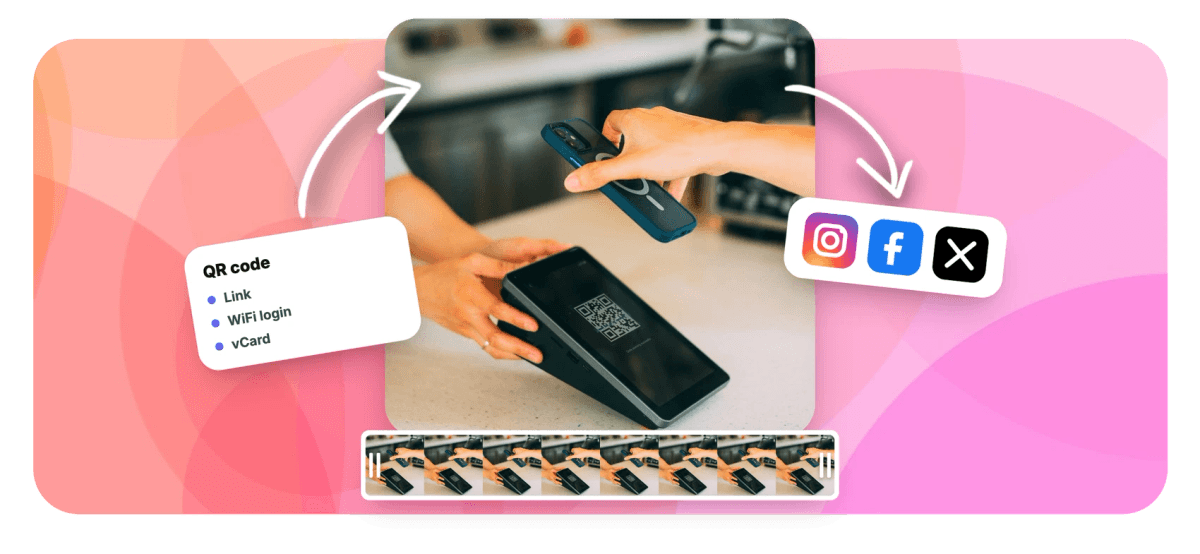
QR Code Generator Features
EchoWave's QR code tools are used by restaurants, marketers, and event teams worldwide.





Branded QR codes
Design a QR code people actually scan
A QR code generator turns a link, a WiFi login, or a contact card into a square code any phone camera can read. EchoWave lets you design the code instead of settling for plain black and white: choose from five dot patterns and three corner-eye styles, apply solid colors or gradients, and drop your logo in the center while the tool raises error correction so the code still reads. Every preview is checked by a real decoder in your browser, and a scans badge confirms it before you export PNG or SVG. When the code belongs in a video, one click adds it to an online video editor project. Need striped codes for products instead? Use the barcode generator.
-
9
content types, from links to WiFi and vCards
-
5
dot patterns, plus 3 corner-eye styles
-
4096px
largest PNG export, with SVG for print
-
0
uploads: codes are generated in your browser
What you get
Everything a good QR code needs
Design, verify, and export scannable codes without leaving the browser.
-
Nine Content Types
Point your code at a link, plain text, a WiFi login, an email, a phone call, an SMS, a WhatsApp chat, a contact card (vCard), or a map location, each with its own guided form.
-
Colors And Gradients
Match your brand with solid colors or linear and radial gradients, and switch the background to transparent so the code sits cleanly on posters, packaging, or video frames.
-
Five Dot Patterns
Swap the standard squares for smooth, rounded, dots, or leaf modules, and pick one of three corner-eye styles, so the code looks designed rather than default.
-
Center Logo Support
Drop a logo into the middle of the code. The tool automatically raises error correction to its highest level and knocks out the dots behind the logo so scanners keep reading it.
-
A Real Scan Check
Every preview is decoded by an actual QR reader running in your browser. The scans badge confirms the code reads back correctly, so you never print a dud.
-
PNG And SVG Export
Download a sharp PNG anywhere from 512 to 4096 pixels for screens and print, grab an infinitely scalable SVG for design tools, or copy the finished code to your clipboard.
-
One Click Into Video
Send the code straight into an EchoWave video project, where it stays re-editable: change the color, the style, or even the destination later without rebuilding it.
-
Runs In Your Browser
Codes are generated locally on your device. Nothing is uploaded unless you choose to add the code to a video project, and there is no account or sign-up to create.
How it works
How to make a QR code
From content to a scan-verified export in four steps.
-
Pick What It Opens
Choose one of nine content types, from a link or WiFi login to a vCard, then fill in the short guided form for that type.
-
Style The Code
Pick a dot pattern and corner-eye style, set solid colors or a gradient, switch on a transparent background, and add your center logo.
-
Watch The Scan Check
The live preview is verified by a real decoder in your browser. Wait for the scans badge before you ship the code anywhere.
-
Export Or Add To Video
Download a PNG from 512 to 4096 pixels, export a vector SVG, copy the code to your clipboard, or add it to a video project with one click.
Who uses it
Who makes QR codes with EchoWave
-
Restaurants and cafes
Put a styled menu code on tables and windows, and point it at a page you can update any time.
-
Marketers and agencies
Bridge print and digital with branded campaign codes that carry colors, gradients, and the client's logo.
-
Event organizers
Share venue WiFi, ticket links, and map locations from posters, badges, and screens between talks.
-
Small businesses
Let customers save a vCard, start a WhatsApp chat, or call the shop with a single scan.
-
Video creators
Add a scannable code to end screens and tutorials, sized and timed inside the editor.
-
Offices and IT teams
Post a WiFi login code in meeting rooms so guests connect without typing a password.
Make a QR code that looks like your brand
Pick what it opens, style it, watch the scan check confirm it, and export PNG or SVG. Free in your browser, with no sign-up.
What creators say after trying EchoWave

About the EchoWave team
EchoWave is a browser-based video and audio editor built by Lemon Vault LLC since 2018. The people who build the editor write these guides and test every step in the production app before publishing.
QR Code Generator FAQ
How do I make a QR code?
Open EchoWave's QR code generator and pick what the code should open: a link, plain text, a WiFi login, an email, a phone call, an SMS, a WhatsApp chat, a contact card, or a map location. Fill in the short form, then style the code with dot patterns, corner-eye styles, colors or gradients, and an optional center logo. The preview is verified by a real decoder as you design, and once the scans badge confirms it reads, download the code as a PNG or SVG. It is free, runs in your browser, and needs no sign-up.
Can I add my logo to the middle of a QR code?
Yes. Upload a logo and the generator places it in the center of the code. To keep the code readable, it automatically raises error correction to level H, the most damage-tolerant setting in the QR standard, and it knocks out the dots behind the logo so the artwork sits on a clean area instead of colliding with modules. The live scan check then confirms the finished design still decodes correctly before you export it, so a logo never silently breaks your code.
How do I know the QR code will actually scan?
EchoWave does not just draw the code, it reads it back. A real QR decoder runs in your browser against every preview, and the scans badge confirms that the exact design you are looking at, with its colors, dot pattern, and logo, decodes to the right content. That catches the classic failures, like low contrast or an oversized logo, before you print a batch of stickers or ship a video. For extra confidence, point your own phone camera at the preview and scan it yourself too.
What can a QR code open?
EchoWave supports nine content types. A link opens any URL, plain text shows a message, and a WiFi login connects a phone to your network without typing the password. Email, phone call, and SMS types start a message or call to the address or number you set. WhatsApp opens a chat, a contact card (vCard) saves your details straight to the address book, and a map location opens the spot in the phone's maps app. Each type has its own guided form, so you never hand-write the underlying format.
Can I make a transparent or gradient QR code?
Yes to both. The background can be fully transparent, which is the right choice when the code sits on a poster, a product label, or a video frame where a white box would look pasted on. For the modules themselves you can use any solid color or a linear or radial gradient. Keep the contrast between the dots and whatever sits behind them strong, dark code on a light surface scans best, and let the built-in scan check confirm your combination reads before you export.
What size should I export a QR code for print?
Export PNG at any size from 512 to 4096 pixels. For screens, 512 to 1024 pixels is plenty. For print, either export a large PNG, 2048 pixels and up covers most posters, or use the SVG export, which is vector and stays perfectly sharp at any physical size, from a business card to a storefront window. Whatever the medium, leave clear space around the code and test a scan from a realistic distance once it is printed.
Is the QR code generator free, and is my data uploaded?
It is free and there is no sign-up. The codes are generated locally in your browser: the link, WiFi password, or contact details you enter are used on your device to draw the code and are not uploaded to EchoWave. The only time anything leaves the browser is when you choose to add the code to a video project, which saves the code into that project so the editor can use it. If you only download PNG or SVG files, nothing is sent anywhere.
Can I put a QR code in a video?
Yes, and it is one click. Add to video sends the code into an EchoWave editor project as a proper element that stays re-editable: change its colors, dot style, or destination later without rebuilding it, then position, resize, and time it over your footage, for example as an end screen that holds for a few seconds. Video exports are free with a small EchoWave watermark and up to 720p, and paid plans remove the watermark and unlock higher resolutions.
Ready to make your code?
Design a scan-verified QR code in your browser for free, then drop it into any video.
Get Started →























































